What is Quantization?
Explanation of quantization for Large Language Models
Introduction
Today, Large Language Models (LLMs) are gaining popularity, especially with the launch of ChatGPT, Claude, Gemini, and more. Many open-source models are freely available and can be accessed through huggingface.co. However, when you try to run these models on your device, you might notice that they are too large for your computer. But fear not! That’s where quantization comes to the rescue.
Precision?
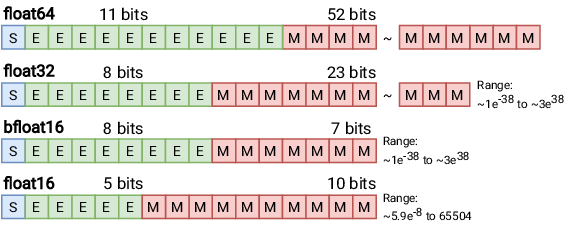
Before diving into quantization, it is important to understand precision. In Fig. 1 (above), you may notice different bit representations of precision. These are referred to as Floating Point (FP) precision formats.
Floating Point numbers are represented using three components:
- Sign (S): A single bit indicating whether the number is positive or negative.
- Exponent (E): Encodes the scale of the number.
- Mantissa (M) (or Fraction): Represents the significant digits of the number.
In deep learning, FP32 (Float32), also known as single-precision floating point, has long been the standard format due to its balance of precision and computational efficiency.
When it comes to quantization, we move away from floating-point formats and instead use 8-bit integers (INT8) to represent numbers. This approach reduces computational complexity and memory usage, making models more efficient for deployment, especially on resource-constrained devices. However, it’s important to note that 8-bit integers and floating-point numbers are fundamentally different in representation and behavior, so they cannot be directly compared.
Quantization
Okey, back to the main topics. What is Quantization? Quantization is a technique aimed to reducing the computational and memory costs of running inference. It works by representing the weights and activations with low-precision data types like 8-bit integers (int8) instead of the usual 32-bit floating point (float32). For example, if you were to run Llama 2-7B in full precision (float32), it would required 28GB of RAM. However, with quantization using 8-bit (int8), you’d only need 7GB of RAM. Such a big difference RIGHT!! 😁
\[\text{Memory} = \text{Number of Parameters (in Billions)} \times \frac{\text{Total Bit Number}}{8}\]Now, let’s not dive too deep into the technicalities. Just a heads-up, quantization comes in different types, such as GPTQ, GGML, GGUF, and QAT. The first three types are commonly used for running inference, while the last one is used when you want to fine-tune the models. So, let’s jump into a practice session!
Setting Up
I am using a MacBook Air M1 with 8GB of RAM for this experiment. The inference will be performed using the state-of-the-art model Llama 3.2 (3B parameters) with a quantization method applied. Based on the calculations mentioned earlier, the model will be loaded using Int8 precision, requiring only 3 GB of memory! This is impressively lightweight and can easily run on a consumer device. Alternatively, for even lower resource requirements, you can opt for the smallest variant, the 1B model. In this example we will use python as Prog. Language, be prepared for the requirements. Here are the different options you can use for quantization approaches.
1. Using BitsAndBytes
bitsandbytes is the easiest option for quantizing a model to 8 and 4-bit. 8-bit quantization multiplies outliers in FP16 with non-outliers in Int8, converts the non-outlier values back to fp16, and then adds them together to return the weights in FP16. This reduces the degradative effect outlier values have on a model’s performance. 4-bit quantization compresses a model even further, and it is commonly used with QLoRA to finetune quantized LLMs.
Make sure to install this dependencies to start with it:
1
pip install transformers accelerate bitsandbytes
1
2
3
4
5
6
7
8
from transformers import AutoModelForCausalLM, BitsAndBytesConfig

quantization_config = BitsAndBytesConfig(load_in_8bit=True)

model_8bit = AutoModelForCausalLM.from_pretrained(
    "meta-llama/Llama-3.2-3B",
    quantization_config=quantization_config
)
2. Using Ollama
Ollama is an open-source project that serves as a powerful and user-friendly platform for running LLMs on your local machine. It acts as a bridge between the complexities of LLM technology and the desire for an accessible and customizable AI experience.
To run model with Ollama is very easy and user-friendly. It already pack-up with several model options in GGML format. So, it already Quantized. We will discussed later about GGML and GGUF in another sessions.
TL;DR
- First, you need to install Ollama in your machine
- You can select several models on their Repo. In this case we still using Llama 3.2 3B
- Move to your terminal and write
ollama run llama3.2:3b - Wait till the download completed and you can start rocking!
By using the command
ollama run llama3.2:3b, the model is automatically loaded in a quantized format, specifically Q4_K_M.
Here’s a breakdown of what this format means:
- Q: Stands for Quantized, indicating that the model uses a compressed representation to reduce memory usage.
- 4: Refers to 4-bit quantization, where each value is represented using 4 bits, significantly lowering the model’s memory footprint.
- K: Represents k-quantization, a technique that uses varying bit widths to optimize memory usage further. This approach is particularly effective for numbers near zero, which tend to appear more frequently, ensuring better rounding accuracy.
- M (Medium): Indicates that medium-sized blocks are used for quantization, balancing efficiency and computational performance.
That’s all, wait for another Breakthrough 🤘🏼
Sources
- https://moocaholic.medium.com/fp64-fp32-fp16-bfloat16-tf32-and-other-members-of-the-zoo-a1ca7897d407
- https://huggingface.co/docs/transformers/quantization/bitsandbytes
- https://huggingface.co/meta-llama/Llama-3.2-3B
- https://andreshat.medium.com/llm-quantization-naming-explained-bedde33f7192